Every query parameter is prefixed by what it does, so a name tells you its role before you read its description.
Prefix
Name
Description
f-
Filter
Narrows the result set (f-year), selects which variant is returned (f-imgFormat, f-imgColor), or modifies another parameter (f-liftsUnrevised).
gf-
Global filter
Turns an API-key-level filter configured in the portal on or off, e.g. gf-vehicleModels.
i-
Include
Adds optional data to each record, e.g. i-colors.
p-
Page
Pagination, see below.
s-
Sort
Orders the collection, asc or desc, e.g. s-price.
Pagination
Every endpoint under Vehicles, Tires and Wheels accepts these two parameters. They are not part of the generated spec, so they do not appear in the parameter tables below.
Name
Default
Description
p-number
1
Page number, counting from 1. A value of 0 or less is treated as 1.
p-size
10
Records per page, up to a maximum of 500. Out-of-range values are clamped rather than rejected: 0 or less becomes 10, and anything above 500 becomes 500.
Responses carry MoreItems, which is true when further records exist past the current page. The two filter endpoints — /tires/filters and /wheels/filters — return several collections inside one object and so have no MoreItems.
Errors
Any status other than 200 carries an Error property describing what went wrong. A 200 with no Error is a success.
Status
Body
Cause
400
{"Error": "Invalid value for query parameter: f-year"}
A parameter failed validation.
401
{"Error": "Invalid API key"}
The key parameter is missing or not valid.
401
{"Error": "Unauthorized access to segment: tires"}
The key is valid but lacks permission for that group. Vehicles, Tires and Wheels each require the matching segment; Status, Auth and E-Commerce need only a valid key.
404
{"Error": "Unknown endpoint"}
No such path.
429
Too many requests. Try again in 412ms
Rate limit exceeded. This one is plain text, not JSON.
500
{"Error": "Query error"}
A server-side failure. Worth reporting to AutoSync.
Rate limits
Requests are limited to 20 per second per API key. Exceeding that returns 429 Too Many Requests with a plain-text body saying how long to wait — unlike every other error, it is not JSON.
Images
Endpoints that return images include a base URL alongside the records. Append an image path to the matching base to compose a full URL.
ImgUrlBase   "https://vehicles.autosyncstudio.com/webp/"
Path         "12292/12292_640_032_PBU-PXR.webp"

Full URL     "https://vehicles.autosyncstudio.com/webp/12292/12292_640_032_PBU-PXR.webp"
Do not hardcode a base or any part of one. Treat it as opaque and read it from the response every time.
A base appears only when the request asks for the images it belongs to, through the matching i- parameter. LiftImgUrlBase additionally depends on a key permission. There are ten base fields in all, and one response may carry several.
Two sizes
A staggered fitment runs different wheels or tires front and rear. Four endpoints can filter on both sizes at once and report each of them separately: /tires/filters, /tires/models, /wheels/filters and /wheels/styles. /tires and /wheels do not — they list individual products, so there is no pair to describe.
Asking for a second size
Either of these switches an endpoint into two-size mode:
Way
Example
A filter ending in 2
f-widths2, f-offsets2, f-diameters2, f-positions2, f-minBore2 on wheels; f-sectionWidth2, f-aspectRatio2, f-rimDiameter2, f-inchWidth2 and the diameter family on tires.
A pipe in f-sizes
Front and rear separated by | — 18x8.5|18x9.5. Tires accept the same in f-sizesWithMargin, and commas still list alternatives: 235/40R18|245/40R18,31X10.50R15|31X11.50R15.
What comes back
Every value that can differ between the two sizes is returned twice: the plain name for size 1, and the same name suffixed 2 for size 2. So Offsets lists the first size's offsets and Offsets2 the second's.
The same sizing and finish fields, plus WheelCount2, InStock2, MinPrice2, MaxPrice2 and the whole i-imgDetails set (ImgWheelId2, ImgDiameter2, ImgWidth2, ImgOffset2, ImgFinish2, ImgColor2 and the rest)
A 2 field only appears in two-size mode. Asking for i-offsets without a second size returns Offsets alone. Wheel image paths are the one exception to the naming: they use _2, as in Img0001_2.
Requiring the rear to be larger
The f-gt…2 and f-gte…2 filters constrain size 2 against size 1 rather than against a value, which is how you list a wider or larger rear. gt requires strictly greater, gte allows equal.
Wheels
Tires
f-gtWidth2 / f-gteWidth2
f-gtInchWidth2 / f-gteInchWidth2
f-gtDiameter2 / f-gteDiameter2
f-gtRimDiameter2 / f-gteRimDiameter2
f-gtSize2 / f-gteSize2 — width and diameter together
—
These only constrain; they do not switch on two-size mode by themselves. Neither does f-inchWidthWithMargin2 on /tires/filters, which filters by the second size but must be paired with another 2 filter for the 2 fields to appear.
Status
Availability check. Use it for uptime monitoring and to confirm a key reaches the service.
Check if the service is available
GET/status
Try it
curl "/status"
Responses
200
OK
The spec does not describe response bodies. Run the request above to see the live shape.
Auth
Validate an API key and inspect what the key is entitled to.
Get API key configuration
GET/keys/config
Try it
curl "/keys/config"
Responses
200
OK
The spec does not describe response bodies. Run the request above to see the live shape.
Check key validity
GET/keys/validate
Try it
curl "/keys/validate"
Responses
200
OK
The spec does not describe response bodies. Run the request above to see the live shape.
Vehicles
The vehicle catalogue: years, makes, models and sub-models, plus full vehicle records.
List vehicles
GET/vehicles
Optional parameters
45 optional parameters
Name
Type
Description
Value
f-acesVehicleId
integer≥ 0
Filter by ACES vehicle ID.
f-bed
string≤ 20 chars
Filter by bed type, e.g. fleetside. Relevant to pickup trucks only.
f-body
string≤ 50 chars
Filter by body type, e.g. coupe.
f-colorId
integer≥ 0
Specify image color by ID. Takes precedence over f-imgColor.
f-doors
integer≥ 0, < 10
Filter by door count, e.g. 2. Currently, only a limited number of vehicles have door count information.
f-drw
boolean
Filter by DRW (Dual Rear Wheel). true returns only DRW vehicles, false returns only SRW (Single Rear Wheel) vehicles.
f-dtImgUpdatedAfter
stringYYYY-MM-DD (optionally with HH:MM:SS)
List only vehicles with DT images updated after a given date, e.g. 2025-01-01 15:45:00 or 2025-01-01.
f-dtTrimId
integer≥ 0
Filter by DT vehicle trim ID.
f-dtTrimIds
stringcomma-separated non-negative integers, at most 500 values
Filter by comma-separated DT vehicle trim IDs.
f-hasDtTrimId
boolean
List only vehicles with DT trim IDs.
f-id
integer≥ 0
Filter by vehicle ID.
f-imgColor
string
Specify image color: rand – random color (default), mono – prefer monochromatic color. f-colorId takes precedence if both are specified.
randmono
f-imgFormat
string
Return paths to images converted to a specified image format. Be aware that delivering images in formats other than the native WebP introduces additional overhead, which may increase the latency when accessing the images.
pngjpegwebp
f-imgUpdatedAfter
stringdate as YYYY-MM-DD
List only vehicles with images updated after a given date, e.g. 2025-01-01.
f-liftsUnrevised
boolean
Modifier for i-lifts. When set, includes vehicles whose lift images have not yet been revised.
f-make
string≤ 50 chars
Filter by make, e.g. Ford.
f-model
string≤ 50 chars
Filter by model name, e.g. F-150.
f-query
string≤ 100 chars
Filter by a full-text search query, e.g. 2025 Ford Bronco Badlands.
f-region
string
Filter by region: US (United States) or CA (Canada). Returns every vehicle sold in that country, including vehicles sold in both countries (region US/CA).
CAUS
f-submodel
string≤ 50 chars
Filter by sub model name, e.g. Wilderness.
f-types
string≤ 50 chars
Filter by comma-separated vehicle types, e.g. car,CUV.
f-vin
stringa valid VIN
Filter by VIN number, e.g. 4S4BTGUD0N3998061. Requires VIN lookup to be activated in the portal. If the VIN does not uniquely identify a single vehicle, multiple results will be returned. Invalid VINs will trigger "Invalid value for query parameter: f-vin" error.
f-year
integer≥ 0, < 2999
Filter by year, e.g. 2025.
i-acesIds
boolean
Include the ACES IDs the vehicle maps to: ACES make ID, ACES base vehicle ID, ACES sub model ID and ACES vehicle ID. Supersedes i-acesVehicleId, which returns ACES vehicle ID alone.
i-acesVehicleId
boolean
Include ACES vehicle ID.
i-colors
boolean
Include a list of available colors.
i-colorsWithImages
boolean
Include a complete list of all available colors with paths to their images.
i-coordinates
stringup to 3 comma-separated angle codes (1/01/001/14/014/32/032)
Include wheel coordinates for comma-separated vehicle angles, e.g. 001,032. Valid vehicle angles: 001, 014, 032. Additional data automatically included: InImageWheelDiameters – minimum and maximum wheel diameters that visually fit the vehicle [inch], Rotations[vehicle angle] – wheel rotation [deg] for each vehicle angle, WheelAngles[vehicle angle] – left and right wheel angles that should be used for each vehicle angle. Angle 014 may additionally include coordinates and the associated data for an externally mounted spare wheels for some vehicles.
i-dtImgUpdatedAt
boolean
Include the date of the latest DT image addition or update.
i-dtTrimId
boolean
Include DT vehicle trim ID.
i-fitments
boolean
Include OE fitments. See i-optionalFitments and i-plusSizes for additional fitments.
i-img
boolean
Include the paths to all images.
i-img001
boolean
Include the path to the side angle images in the default color.
i-img014
boolean
Include the path to the rear angle images in the default color.
i-img032
boolean
Include the path to the front angle images in the default color.
i-imgStockWheels
boolean
Include stock wheel images. These are images of wheels that have been cut out from vehicle images and can be overlaid on tires.
i-imgUpdatedAt
boolean
Include the date of the latest image addition or update.
i-inImageWheelDiameters
boolean
Include wheel diameters that visually fit the vehicle image.
i-lifts
boolean
Include lift data and images for all vehicle angles: 001, 014, 032.
i-optionalFitments
boolean
Include OE optional fitments.
i-plusSizes
boolean
Include extended fitment options.
i-region
boolean
Include region: US (United States), CA (Canada), or US/CA (both). Vehicles sold in both countries report US/CA.
i-tags
boolean
Include tags and a niche tag.
s-descriptionLength
string
Sort by vehicle description length. For example, combining s-descriptionLength=asc with f-query=2022 Ford Bronco Big Bend will return the larger Bronco first, followed by the smaller Bronco Sport, since the former has a shorter description.
ascdesc
s-dtImgUpdatedAt
string
Sort by the date of the latest image addition or update to the DT vehicle (asc or desc).
ascdesc
Try it
curl "/vehicles"
Responses
200
OK
The spec does not describe response bodies. Run the request above to see the live shape.
Fitment data
Every OE fitment fits without modification to the
vehicle — no lift kit or body work. See
Mapping Products to Vehicles
for how to use this data to filter products.
i-fitments returns a Fitments array and adds these vehicle-level fields:
Field
Meaning
BoltCircle
Bolt circle diameter.
Bore
Centre bore.
BoreRear
null when absent or equal to Bore.
DefaultChassisId
When several chassis map to the vehicle, the closest match.
LoadRating
Minimum tire load rating.
LoadRatingRear
Rear load rating.
LugCount
Number of lugs.
MaxWheelLoad
Maximum weight the vehicle exerts on each wheel in operation.
RaceTires
Boolean flag carried on the vehicle record.
StaggeredWidth
The vehicle is commonly fitted with staggered-width wheels and tires.
StaggeredDiameter
The vehicle is commonly fitted with staggered-diameter (and width) wheels and tires.
Staggered
Deprecated — equal to StaggeredWidth. Use StaggeredWidth and StaggeredDiameter.
StaggeredWidth and StaggeredDiameter describe whether a vehicle is a candidate for staggered wheels, not whether
it left the factory with them. A 2022 Chevrolet Camaro LS has no factory staggered wheels but is often upgraded to
them, so it reports StaggeredWidth: true.
i-optionalFitments returns OE optional fitments in a separateOptionalFitments array, in the same shape as
Fitments.
i-plusSizes returns a PlusSizes array. Plus sizes are aftermarket wheel sizes, and the tire sizes for each, aimed
at the tuning market. They are independent of i-fitments — you can request either without the other — but a plus
size is only meaningful next to the fitment it shares a ChassisId with.
Chassis
Every fitment and plus size carries a ChassisId, because a sub-model alone does not uniquely identify a chassis.
Vehicle 83184, for example, spans two:
ChassisId 70429  Name "19""
ChassisId 92428  Name "Ceramic Brake Package"
A vehicle typically has a few fitments sharing a chassis and several plus sizes per chassis. Match plus sizes to
fitments by ChassisId — which plus sizes you offer depends on which OE fitment the user picked.
Identifying fitments
Each entry in Fitments and OptionalFitments has an Id and a ChassisId. Fitments entries also carry a Name
distinguishing one option from another on the same chassis; it is often an empty string, and OptionalFitments
entries have no Name at all.
Format
Format states how to read the size fields:
Value
Size style
Fields populated
M
Metric, e.g. 245/70R17
SectionWidth, AspectRatio, RimDiameter
F
Flotation, e.g. 37x12.50R17
Diameter, RimWidth, RimDiameter
O
Other non-standard size
—
U
Unknown — the size string could not be broken into components
RimWidth, RimDiameter only
These are the same four values f-format and f-notFormat accept.
A U size still carries a usable TireSize string, but SectionWidth, AspectRatio, Diameter and InchWidth are
all null, so match it on the string rather than on the components.
Notes
Notes on a plus size is an empty array when the fitment has no special requirements. Otherwise it holds one or more
strings describing what to check, for example:
"Notes": ["Check fitment, possible clearance issues"]
Tags
i-tags adds:
Field
Meaning
WheelSegmentTags
Wheel segment tags for the vehicle.
NicheTag
Identifies wheels made for this vehicle only, used mainly for replica wheels. null when the vehicle has none.
TireVehicleTypeTag
The tire vehicle-type tag derived from the vehicle's Type.
Tags
Deprecated — identical to WheelSegmentTags. Use WheelSegmentTags.
ACES IDs
i-acesIds returns ACES identifiers the vehicle maps to. AcesVehicleId is the value i-acesVehicleId returns on
its own, and the one f-acesVehicleId filters on. i-acesIds supersedes i-acesVehicleId — requesting both
changes nothing.
A vehicle not yet mapped to ACES reports every ACES field as null.
Wheel coordinates
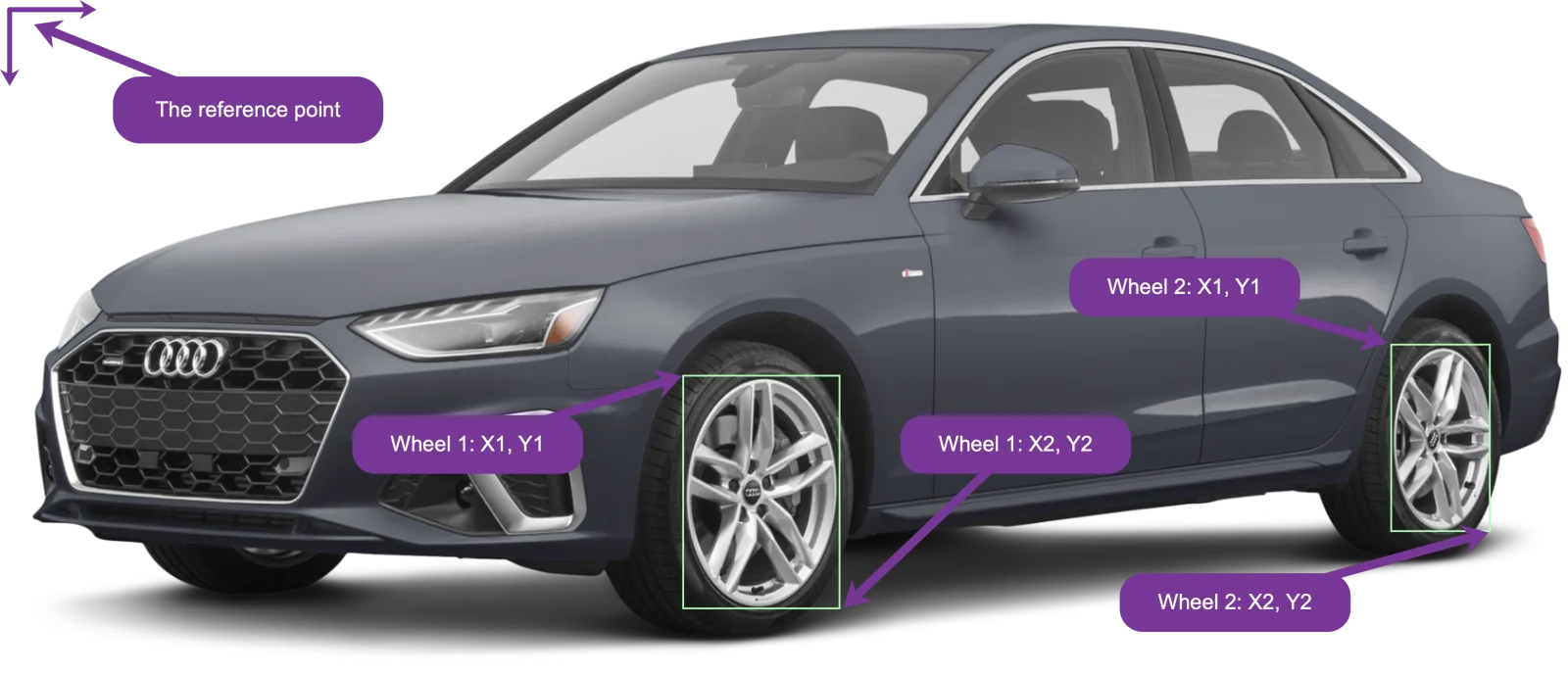
i-coordinates returns, for each requested vehicle angle, the box where a wheel image should be overlaid on the
vehicle image. Pass a comma-separated list of up to three angles:
Angle
View
001
Side
014
Rear
032
Front
/vehicles?f-id=10030&i-coordinates=014,032
Leading zeros are optional — 1, 01 and 001 are the same angle.
Each requested angle adds three fields, plus InImageWheelDiameters once for the whole record:
Field
Contents
Coordinates0NN
One [x1, y1, x2, y2] box per wheel. [] when the vehicle has no coordinates for that angle.
Rotations0NN
Rotation in degrees per wheel, in the same order. The field is absent, not empty, when rotations are unavailable.
WheelAngles0NN
Which wheel image angle to overlay on each wheel, in the same order.
Most vehicles have no coordinates at all, so treat the empty array and the missing Rotations field as ordinary
cases rather than errors.
Reading a box
The four values are x1, y1 (top-left) and x2, y2 (bottom-right), given as fractions of the image width
and height measured from its top-left corner — multiply by 100 for a CSS percentage. The first entry is the left
wheel, the second the right.
x values always fall inside the image. y2 occasionally exceeds 1, meaning the wheel extends slightly past the
bottom edge, so do not clamp it.
Rotations go straight into rotate(); a negative value turns the wheel counter-clockwise. Overlaid wheels line up
with the original rims best when rotated this way.
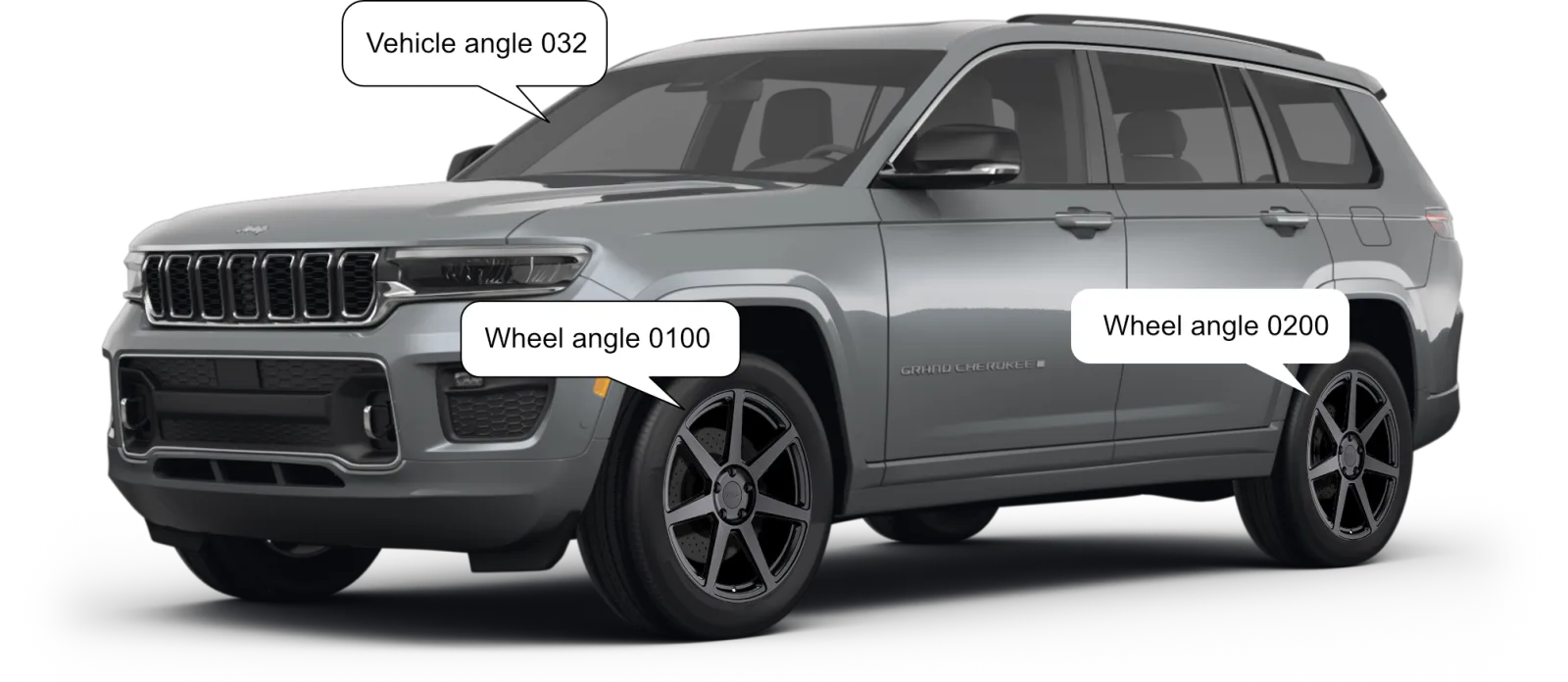
Applied to a real vehicle image, the two boxes and rotations above place the wheels like this:
Both wheels here use the 0100 image, because that is what this vehicle's WheelAngles032 asks for. The boxes are
not the same shape as the wheel image, so each is stretched to fill its box — set width and height independently
rather than preserving the aspect ratio.
If you would rather not build the compositing yourself, VVS Express already does it — it handles the positioning,
rotation and layering from these same values. See the
Visual Vehicle Studio Express docs.
Which wheel image to use
WheelAngles names the wheel image angle to layer on each wheel — the same codes /wheels uses for
i-img0100, i-img0200 and i-img0300:
Vehicle angle
Wheel angles returned
014, 032
0100 (view-on-vehicle front) or 0200 (view-on-vehicle rear)
001
Always 0300 (view-on-vehicle face) — or 0300Front and 0300Rear for a dual-rear-wheel vehicle
Externally mounted spare wheels
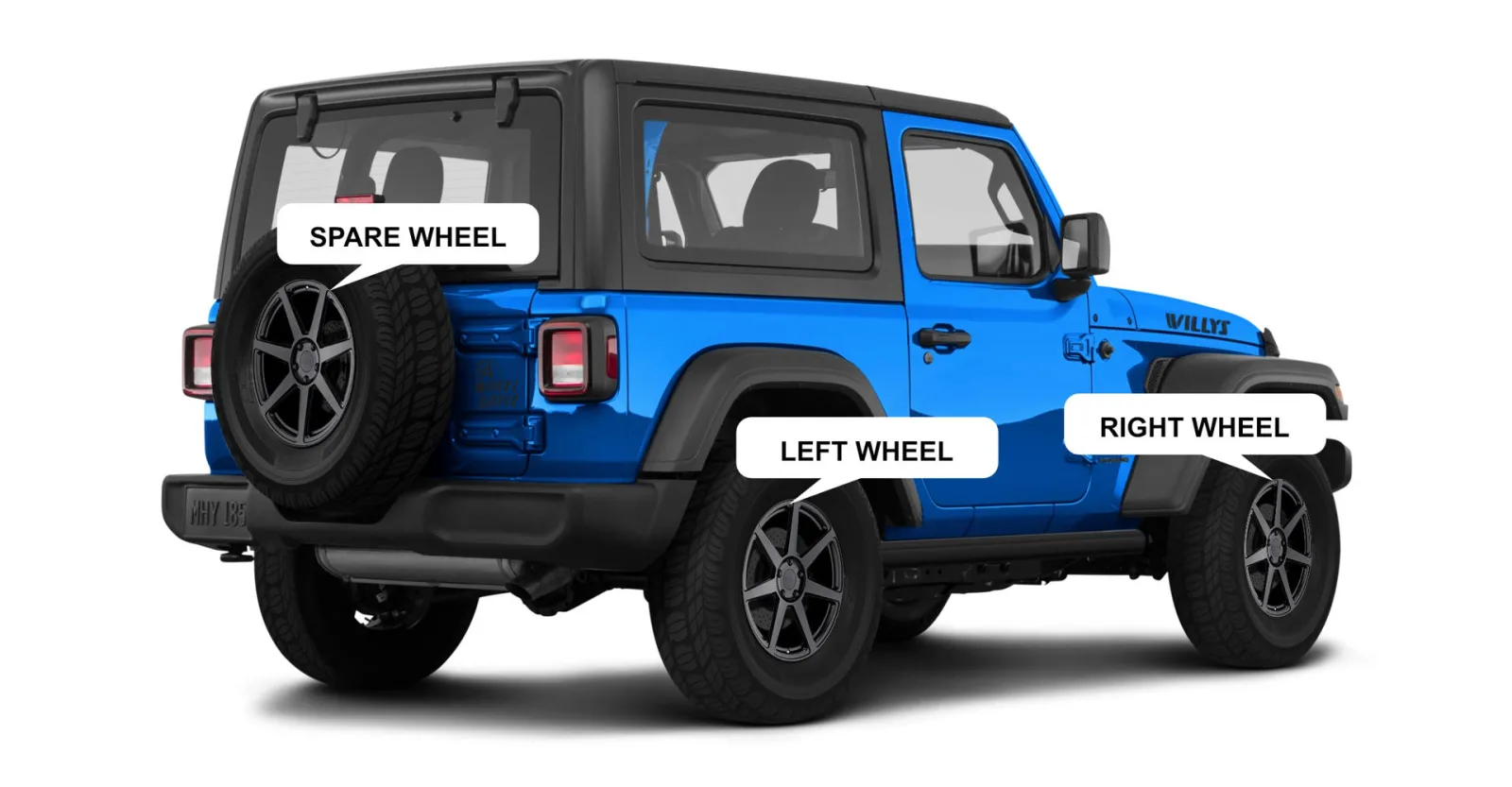
A few vehicles carry a full-size spare on the outside. For angle 014 only, those get a third entry appended to all
three arrays:
The spare is always the third entry, whatever its position in the picture — the order is left, right, spare, not
left-to-right across the image.
The wheel diameters, in inches, that visually fit the vehicle image:
Field
Meaning
Front
Front diameter as shown in the image.
FrontMax
Largest front diameter that still fits the image.
Rear
Rear diameter as shown in the image.
RearMax
Largest rear diameter that still fits.
The whole object is null when no diameter data exists for the vehicle.
Rear and RearMax fall back to Front and FrontMax when no rear measurement is stored, which is the case for
almost every vehicle. Equal front and rear values therefore mean "no separate rear measurement", not "the axles
match".
DT trims
Several DT trims can map to one vehicle. Whenever a request uses a DT parameter — f-dtTrimId, f-dtTrimIds,
f-hasDtTrimId, f-dtImgUpdatedAfter, i-dtTrimId, i-dtImgUpdatedAt or s-dtImgUpdatedAt — the list holds
one entry per trim, so a vehicle with three trims appears three times, differing only in DtTrimId when that is
included. The page size counts entries, not vehicles. Without a DT parameter every vehicle appears once.
List vehicle makes
GET/vehicles/makes
Optional parameters
5 optional parameters
Name
Type
Description
Value
f-types
string≤ 50 chars
Filter by comma-separated vehicle types, e.g. van,truck.
f-year
integer≥ 0, < 2999
Filter by year, e.g. 1999.
i-aaiaBrandCode
boolean
Include AutoCare's brand ID.
i-logos
boolean
Include the paths to make logos.
i-vehicleCount
boolean
Include the number of vehicles for each make (subject to the filters).
Try it
curl "/vehicles/makes"
Responses
200
OK
The spec does not describe response bodies. Run the request above to see the live shape.
List vehicle models
GET/vehicles/models
Optional parameters
17 optional parameters
Name
Type
Description
Value
f-imgColor
string
Specify preferred image colors. rand – random colors (default), mono – prefer monochromatic colors. Takes effect only if any images are included.
randmono
f-imgFormat
string
Return paths to images converted to a specified image format. Be aware that delivering images in formats other than the native WebP introduces additional overhead, which may increase the latency when accessing the images.
pngjpegwebp
f-make
string≤ 50 chars
Filter by make, e.g. Chevrolet.
f-query
string≤ 50 chars
Filter by a full-text search query, e.g. 2025 Chevrolet.
f-types
string≤ 50 chars
Filter by comma-separated vehicle types, e.g. car,cuv.
f-year
integer≥ 0, < 2999
Filter by year, eg.g 2023.
gf-vehicleModels
boolean
Enable/disable API key-level filter for vehicle models. If disabled, the API will ignore "Allowed Vehicle Models" setting in the portal. true - enable (default), false - disable.
i-body
boolean
Include body type. The same model will be listed multiple times if it’s available in multiple body types (e.g. Hatchback and Sedan). Both i-body and i-drw may include multiple variants for a single vehicle model.
i-drw
boolean
Include DRW. If a model is available in both SRW (Single Rear Wheel) and DRW (Dual Rear Wheel) variants, it will be listed twice. Both i-drw and i-body may include multiple variants for a single vehicle model.
i-img
boolean
Include the paths to images of all angles in the default color.
i-img001
boolean
Include the path to the side angle images in the default color.
i-img014
boolean
Include the path to the rear angle images in the default color.
i-img032
boolean
Include the path to the front angle images in the default color.
i-imgYear
boolean
Include the year of the vehicle in the image (it may be different from the year of the vehicle). Takes effect only if any images are included.
i-maxYear
boolean
Include the latest year for each vehicle model, e.g 2019 for Jaguar XJ which was discontinued in 2020. When i-year parameter is used, i-maxYear will have the same value.
i-type
boolean
Include vehicle type.
i-year
boolean
Include years.
Try it
curl "/vehicles/models"
Responses
200
OK
The spec does not describe response bodies. Run the request above to see the live shape.
List vehicle sub models
GET/vehicles/submodels
Optional parameters
15 optional parameters
Name
Type
Description
Value
f-doors
integer≥ 0, < 10
Filter by door count, e.g. 2. Currently, only a limited number of vehicle sub models have door count information.
f-drw
boolean
Filter by DRW (Dual Rear Wheel). true returns only DRW vehicles, false returns only SRW (Single Rear Wheel) vehicles.
f-imgColor
string
Specify preferred image colors: rand – random colors (default), mono – prefer monochromatic colors. Takes effect only if any images are included.
randmono
f-imgFormat
string
Return paths to images converted to a specified image format. Be aware that delivering images in formats other than the native WebP introduces additional overhead, which may increase the latency when accessing the images.
pngjpegwebp
f-make
string≤ 50 chars
Filter by make, e.g. Ford.
f-model
string≤ 50 chars
Filter by model name, e.g. F-150.
f-query
string≤ 50 chars
Filter by a full-text search query, e.g. Volvo V90.
f-types
string≤ 50 chars
Filter by comma-separated vehicle types, e.g. car,CUV.
f-year
integer≥ 0, < 2999
Filter by year, e.g. 2025.
i-body
boolean
Include body type. The same sub model will be listed multiple times if it is available in multiple body types.
i-img
boolean
Include the paths to images of all angles in the default color.
i-img001
boolean
Include the path to the side angle images in the default color.
i-img014
boolean
Include the path to the rear angle images in the default color.
i-img032
boolean
Include the path to the front angle images in the default color.
i-type
boolean
Include vehicle type.
Try it
curl "/vehicles/submodels"
Responses
200
OK
The spec does not describe response bodies. Run the request above to see the live shape.
List vehicle years
GET/vehicles/years
Optional parameters
4 optional parameters
Name
Type
Description
Value
f-make
string≤ 50 chars
Filter by make, e.g. Tesla.
f-model
string≤ 50 chars
Filter by model, e.g. Bronco.
f-submodel
string≤ 50 chars
Filter by sub model, e.g. Wilderness.
f-types
string≤ 50 chars
Filter by comma-separated vehicle types, e.g. truck,van.
Try it
curl "/vehicles/years"
Responses
200
OK
The spec does not describe response bodies. Run the request above to see the live shape.
Tires
Tire inventory, the models behind it, and the filter values available for narrowing a search.
List tires
GET/tires
Optional parameters
70 optional parameters
Name
Type
Description
Value
f-andNotSegmentTags
string≤ 150 chars
Filter by segment tags excluding specified tags. Comma (,) acts as an AND operator, e.g. All Terrain,All Weather for tires classified as not All Terrain and not All Weather.
f-andNotVehicleTypeTags
string≤ 50 chars
Filter by vehicle type tags excluding specified tags. Comma (,) acts as an AND operator, e.g. Car,SUV/Light Truck for tires designed as not for cars and not for SUVs.
f-andSegmentTags
string≤ 150 chars
Filter by segment tags. Comma (,) acts as an AND operator, e.g. All Terrain,All Weather for tires classified as both All Terrain and All Weather.
f-andVehicleTypeTags
string≤ 50 chars
Filter by vehicle type tags. Comma (,) acts as an AND operator, e.g. Car,SUV/Light Truck for tires designed for both cars and SUVs.
f-aspectRatio
number≥ 0, < 100
Filter by aspect ratio, e.g. 45. Applies to metric tires only.
f-brand
string≤ 50 chars
Filter by brand name, e.g. Michelin.
f-brandIds
stringcomma-separated non-negative integers, at most 100 values
Filter by comma-separated brand IDs, e.g. 265,267.
f-diameter
number0–200
Filter by external diameter, e.g. 33 [inch]. Applies to both metric and floatation tires. Use f-format to specify tire type.
f-diameterWithMargin
number0–200
Filter by external diameter with a positive margin of variance, e.g. 33 [inch] for values between approximately 33" and 34". Applies to both metric and floatation tires. Use f-format to specify tire type.
f-format
string
Filter by size format (M - metric, F - flotation, O - other non-standard size, or U - unknown).
MFOU
f-hasCoordinates
boolean
List only tires with wheel coordinates for overlaying wheels on tires.
f-hasExternalProductId
boolean
List only tires with external product IDs. Requires external product IDs to be activated and configured in the portal.
f-hasImg0100
boolean
List only tires with available view-on-vehicle images of angle 0100.
f-hasImg0301
boolean
List only tires with available view-on-vehicle images of angle 0301.
f-hasImgRotation
boolean
List only tires with rotation images.
f-hasPrice
boolean
List only tires with prices. Requires pricing to be activated in the portal.
f-hasRebates
boolean
List only tires with rebates.
f-hasVovImg
boolean
List only tires with available view-on-vehicle images of angle 0100 or 0301.
f-id
integer≥ 0
Filter by tire ID.
f-ids
stringcomma-separated non-negative integers, at most 500 values
Filter by comma-separated tire IDs, e.g. 1932823,1931763.
f-imgUpdatedAfter
stringdate as YYYY-MM-DD
List only tires with images updated after a given date, e.g. 2025-01-01.
f-inStock
boolean
List only tires that are in stock. Requires inventory to be activated in the portal.
f-inchWidth
number0–1000
Filter by width, e.g. 12.5 [inch]. Applies to both metric and floatation tires. Use f-format to specify tire type.
f-inchWidthWithMargin
number0–1000
Filter by width with a margin of variance, e.g. 12 [inch] for values between approximately 11.5" and 12.5". Applies to both metric and floatation tires. Use f-format to specify tire type.
f-maxDiameter
number0–200
Filter by maximum external diameter, e.g. 35 [inch]. Applies to both metric and floatation tires. Use f-format to specify tire type.
f-maxPrice
number0–100000
Filter by maximum price [$].
f-minDiameter
number0–200
Filter by minimum external diameter, e.g. 30 [inch]. Applies to both metric and floatation tires. Use f-format to specify tire type.
f-minInventory
integer≥ 0
Filter by minimum inventory level, e.g. 4. Setting the parameter to 1 is the same as using f-inStock parameter. Requires inventory to be activated in the portal.
f-minLoadRating
integer0–2000
Filter by minimum load rating, e.g. 100.
f-minPrice
number0–100000
Filter by minimum price [$].
f-minRimDiameter
number≥ 0, < 99
Filter by minimum rim diameter, e.g. 18 [inch]. Applies to both metric and floatation tires. Use f-format to specify tire type.
f-minSpeedRating
string
Filter by minimum speed rating. E.g. H speed rating will return tires with one of the following speed ratings: H, V, Z, W, Y, (Y) (H or higher).
DEFGHJKLMNPQRSTUVWY(Y)Z
f-minSpeedRatings
string≤ 20 chars
Filter by the lowest of comma-separated minimum speed ratings. E.g. H,V,W,U will result in filtering by U speed rating (the lowest of the four) and will return tires with one of the following speed ratings: U, H, V, Z, W, Y, (Y) (H or higher).
f-model
string≤ 50 chars
Filter by model name, e.g. Crossclimate 2.
f-modelId
integer≥ 0
Filter by model ID.
f-modelIds
stringcomma-separated non-negative integers, at most 500 values
Filter by model ID.
f-notFormat
string
Exclude size format (M - metric, F - flotation, O - other non-standard size, or U - unknown).
MFOU
f-orSegmentTags
string≤ 150 chars
Filter by segment tags. Comma (,) acts as an OR operator, e.g. All Terrain,All Weather for tires classified as either All Terrain or All Weather.
f-orVehicleTypeTags
string≤ 50 chars
Filter by vehicle type tags. Comma (,) acts as an OR operator, e.g. Car,Trailer for tires designed for either for cars or trailers.
f-pn
string≤ 50 chars
Filter by part number. Reserved characters must be URL-encoded, e.g. + → %2B. **Specifying a part number is not sufficient to uniquely identify a tire.** A part number must be combined with a brand for distinct results. For example, f-pn=99883&f-brand=Michelin.
f-query
string≤ 50 chars
Filter by a full-text search, e.g. Michelin 225/50R17. Searched fields include brand, model, model description, part number and display name.
f-rimDiameter
number≥ 0, < 99
Filter by rim diameter, e.g. 22 [inch]. Applies to both metric and floatation tires. Use f-format to specify tire type.
f-roundedDiameter
integer0–200
Filter by external diameter rounded to a whole number, e.g. 33 [inch]. Applies to both metric and floatation tires. Use f-format to specify tire type.
f-sectionWidth
number0–10000
Filter by section width, e.g. 235 [mm]. Applies to metric tires only.
f-sizes
string≤ 5000 chars
Filter by comma-separated sizes, e.g. 215/65R17,225/65R17 for metric tires and 31X10.50R15,33X10.50R15 for floatation tires.
f-sizesWithMargin
string≤ 5000 chars
Filter by comma-separated sizes and compatible sizes with a margin of variance. E.g. 215/65R15,225/60R16 list tires of the following sizes: 215/65R15, 215/60R16, 215/65R16, 225/60R16, and 26x8.5R15.
f-status
string
Filter by status (active or discontinued). A key receives only the statuses it is configured for; asking for discontinued on a key configured for active tires only returns nothing.
activediscontinued
f-updatedAfter
stringdate as YYYY-MM-DD
List only tires updated after a given date, e.g. 2025-01-01.
f-winterClass
string
Filter by winter classification (studless, studdable, or studded)
studlessstuddablestudded
i-coordinates
boolean
Include wheel coordinates for overlaying wheels on tires.
i-drId
boolean
Include DriveRight Data tire ID.
i-externalProductId
boolean
Include external product IDs. Requires external product IDs to be activated and configured in the portal.
i-img
boolean
Include paths to non-view-on-vehicle images.
i-imgDetails
boolean
Include the ID of the tire represented in the image.
i-imgUpdatedAt
boolean
Include the date of the latest image addition or update.
i-inStock
boolean
Include stock availability. Requires inventory to be activated in the portal.
i-inventory
boolean
Include inventory level. Requires inventory to be activated in the portal.
i-price
boolean
Include price. Requires pricing to be activated in the portal.
i-rebates
boolean
Include rebate information.
i-specs
boolean
Include specifications.
i-status
boolean
Include the status (active or discontinued). Discontinued tires are listed only for keys configured to receive them; for every other key the value is always active.
i-tags
boolean
Include segment and vehicle type tags.
i-uid
boolean
Include Unique ID, which is a combination of brand ID and tire SKU. Tire SKUs are not always unique.
i-updatedAt
boolean
Include the date of the last changes.
i-vovImg
boolean
Include URLs of view-on-vehicle images.
s-brand
string
Sort by brand (asc or desc). A brand priority list configured in the portal takes precedence.
ascdesc
s-hasVovImg
string
Sort by VoV image availability (asc - tires without VoV images first, desc - tires with VoV images first). A brand priority list configured in the portal takes precedence.
ascdesc
s-inventory
string
Sort by inventory level (asc - lowest stock first, desc - highest stock first). Tires without inventory are always listed last, regardless of the direction. A brand priority list configured in the portal takes precedence. Requires inventory to be activated in the portal.
ascdesc
s-model
string
Sort by model (asc or desc). A brand priority list configured in the portal takes precedence.
ascdesc
s-price
string
Sort by price (asc - cheapest first, desc - most expensive first). Tires without a price are always listed last, regardless of the direction. A brand priority list configured in the portal takes precedence. Requires pricing to be activated in the portal.
ascdesc
Try it
curl "/tires"
Responses
200
OK
The spec does not describe response bodies. Run the request above to see the live shape.
Rotation images
A rotation image is a spin: a sequence of stills of one tire photographed through a full turn, which you play back to
let someone rotate the tire. i-img returns two things for it, alongside the five still images:
Field
Contents
RotationImgUrlBase
The base URL for spins. Separate from ImgUrlBase, and not interchangeable with it.
ImgRotationDir
A directory name, not a file. null when the tire has no spin.
Compose a frame by joining the base, the directory and the frame number:
Frames are numbered from 1, and every spin currently published runs to 36 — one frame per 10° of a full turn.
Nothing in the API states the count, so treat it as a convention rather than a guarantee: tolerate a missing frame
rather than aborting the sequence. At least one published spin has no frame 1 and starts at 2.
Each frame is a full-size image of roughly 70 KB, so a whole spin is a few megabytes. Load them lazily, or
progressively as the user drags, rather than all at once.
ImgRotationDir is null for most tires — spins exist for a small fraction of the catalogue. On /tires you can
narrow the results to only those that have one with f-hasImgRotation. /tires/models returns the same field but has
no equivalent filter.
List tire brands
GET/tires/brands
Optional parameters
18 optional parameters
Name
Type
Description
Value
f-format
string
Filter by size format (M - metric, F - flotation, O - other non-standard size, or U - unknown).
MFOU
f-hasExternalProductId
boolean
List only tire brands with tires that have external product IDs.
f-hasImg0100
boolean
List only tire brands with tires that have available view-on-vehicle images of angle 0100.
f-hasImg0301
boolean
List only tire brands with tires that have available view-on-vehicle images of angle 0301.
f-hasPrice
boolean
List only tire brands with tires that have prices. Requires pricing to be activated in the portal.
f-hasVovImg
boolean
List only tire brands with tires that have available view-on-vehicle images of angle 0100 or 0301.
f-id
integer≥ 0
Filter by brand ID.
f-inStock
boolean
List only tire brands with tires in stock. Requires inventory to be activated in the portal.
f-notFormat
string
Exclude size format (M - metric, F - flotation, O - other non-standard size, or U - unknown).
MFOU
f-winterClass
string
Filter by winter classification (studless, studdable, or studded)
studlessstuddablestudded
i-aaiaBrandCode
boolean
Include AutoCare's brand ID.
i-about
boolean
Include brand’s about information.
i-imgBanner
boolean
Include the paths to banner images.
i-imgBannerLogo
boolean
Include the paths to banner logo images.
i-logos
boolean
Include the paths to brand logos.
i-manufacturer
boolean
Include brand’s manufacturer.
i-tireCount
boolean
Include the total number of tires for each brand.
i-tireModelCount
boolean
Include the total number of tire models for each brand.
Try it
curl "/tires/brands"
Responses
200
OK
The spec does not describe response bodies. Run the request above to see the live shape.
List default tires for lifted vehicles
GET/tires/default_images
Try it
curl "/tires/default_images"
Responses
200
OK
The spec does not describe response bodies. Run the request above to see the live shape.
List tire filters
GET/tires/filters
Optional parameters
65 optional parameters
Name
Type
Description
Value
f-andNotSegmentTags
string≤ 150 chars
Filter by segment tags excluding specified tags. Comma (,) acts as an AND operator, e.g. All Terrain,All Weather for tires classified as not All Terrain and not All Weather.
f-andNotVehicleTypeTags
string≤ 50 chars
Filter by vehicle type tags excluding specified tags. Comma (,) acts as an AND operator, e.g. Car,SUV/Light Truck for tires classified as not for cars and not for SUVs.
f-andSegmentTags
string≤ 150 chars
Filter by segment tags. Comma (,) acts as an AND operator, e.g. All Terrain,All Weather for tires classified as both All Terrain and All Weather.
f-andVehicleTypeTags
string≤ 50 chars
Filter by vehicle type tags. Comma (,) acts as an AND operator, e.g. Car,SUV/Light Truck for tires designed for both cars and SUVs.
f-aspectRatio
number≥ 0, < 1000
Filter by aspect ratio, e.g. 55. Applies to metric tires only.
f-aspectRatio2
number≥ 0, < 1000
Filter by secondary tire aspect ratio, e.g. 65. Specifying f-aspectRatio and f-aspectRatio2 will list only filter values applicable to tires of both aspect ratios. Intended for vehicles with staggered fitment. Applies to metric tires only.
f-brand
string≤ 50 chars
Filter by brand name, e.g. Bridgestone.
f-brandIds
stringcomma-separated non-negative integers, at most 100 values
Filter by comma-separated brand IDs 265,267.
f-diameter
number≥ 0, < 200
Filter by external diameter, e.g. 33 [inch]. Applies to both metric and floatation tires. Use f-format to specify tire type.
f-diameter2
number≥ 0, < 200
Filter by secondary tire external diameter, e.g. 35 [inch]. Specifying f-diameter and f-diameter2 will list only filter values applicable to tires of both diameters. Intended for vehicles with staggered fitment. Applies to both metric and floatation tires. Use f-format to specify tire type.
f-diameterWithMargin
number0–200
Filter by external diameter with a positive margin of variance, e.g. 33 [inch] for values between approximately 33" and 34". Applies to both metric and floatation tires. Use f-format to specify tire type.
f-diameterWithMargin2
number0–200
Filter by secondary external diameter with a positive margin of variance, e.g. 33 [inch] for values between approximately 33" and 34". Specifying f-diameterWithMargin and f-diameterWithMargin2 will list only filter values applicable to tires of both diameters with a margin of variance. Intended for vehicles with staggered fitment. Applies to both metric and floatation tires. Use f-format to specify tire type.
f-format
string
Filter by size format (M - metric, F - flotation, O - other non-standard size, or U - unknown).
MFOU
f-gtInchWidth2
boolean
Enforce size 2 inch widths to be greater than size 1. This may be used to list larger tires for rear axles. Intended for vehicles with staggered fitment.
f-gtRimDiameter2
boolean
Enforce size 2 rim diameters to be greater than size 1. This may be used to list larger tires for rear axles. Intended for vehicles with staggered fitment.
f-gteInchWidth2
boolean
Enforce size 2 inch widths to be greater than size 1 or equal. This may be used to list larger tires for rear axles. Intended for vehicles with staggered fitment.
f-gteRimDiameter2
boolean
Enforce size 2 rim diameters to be greater than size 1 or equal. This may be used to list larger tires for rear axles. Intended for vehicles with staggered fitment.
f-hasExternalProductId
boolean
List only values of tires with external product IDs.
f-hasImg0100
boolean
List only values of tires with available view-on-vehicle images of angle 0100.
f-hasImg0301
boolean
List only values of tires with available view-on-vehicle images of angle 0301.
f-hasPrice
boolean
List only values of tires with prices. Requires pricing to be activated in the portal.
f-hasRebates
boolean
List only values of tires with rebates.
f-hasVovImg
boolean
List only values of tires with available view-on-vehicle images of angle 0100 or 0301.
f-inStock
boolean
List only values of tires that are in stock. Requires inventory to be activated in the portal.
f-inchWidth
number≥ 0, < 1000
Filter by width, e.g. 10.5 [inch]. Applies to floatation tires only.
f-inchWidth2
number≥ 0, < 1000
Filter by secondary width, e.g. 11.5 [inch]. Specifying f-inchWidth and f-inchWidth2 will list only filter values applicable to tires of both inch widths. Intended for vehicles with staggered fitment. Applies to floatation tires only.
f-inchWidthWithMargin
number0–1000
Filter by width with a positive margin of variance, e.g. 10 [inch] for values between approximately 10" and 10.5". Applies to both metric and floatation tires. Use f-format to specify tire type.
f-inchWidthWithMargin2
number0–1000
Filter by secondary width with a positive margin of variance, e.g. 11 [inch] for values between approximately 11" and 11.5". Specifying f-inchWidthWithMargin and f-inchWidthWithMargin2 will list only filter values applicable to tires of both inch widths with a margin of variance. Intended for vehicles with staggered fitment. Applies to both metric and floatation tires. Use f-format to specify tire type.
f-maxDiameter
number≥ 0, < 200
Filter by maximum external diameter, e.g. 35 [inch]. Applies to both metric and floatation tires. Use f-format to specify tire type.
f-maxDiameter2
number≥ 0, < 200
Filter by secondary tire maximum external diameter, e.g. 35 [inch]. Specifying f-maxDiameter and f-maxDiameter2 will list only filter values applicable to tires of both diameters. Intended for vehicles with staggered fitment. Applies to both metric and floatation tires. Use f-format to specify tire type.
f-maxPrice
number0–100000
Filter by maximum price [$].
f-minDiameter
number≥ 0, < 200
Filter by minimum external diameter, e.g. 30 [inch]. Applies to both metric and floatation tires. Use f-format to specify tire type.
f-minDiameter2
number≥ 0, < 200
Filter by secondary tire minimum external diameter, e.g. 30 [inch]. Specifying f-minDiameter and f-minDiameter2 will list only filter values applicable to tires of both diameters. Intended for vehicles with staggered fitment. Applies to both metric and floatation tires. Use f-format to specify tire type.
f-minLoadRating
integer0–2000
Filter by minimum load rating, e.g. 91.
f-minLoadRating2
integer0–2000
Filter by minimum load rating, e.g. 95. Specifying f-minLoadRating and f-minLoadRating2 will list only filter values applicable to tires of both load ratings. Intended for vehicles with staggered fitment.
f-minPrice
number0–100000
Filter by minimum price [$].
f-minRimDiameter
number≥ 0, < 99
Filter by minimum rim diameter, e.g. 18 [inch].
f-minSpeedRating
string
Filter by minimum speed rating. E.g. H speed rating will return filter values applicable to tires with one of the following speed ratings: H, V, Z, W, Y, (Y) (H or higher).
DEFGHJKLMNPQRSTUVWY(Y)Z
f-minSpeedRating2
string
Filter by minimum speed rating. E.g. H speed rating will return filter values applicable to tires with one of the following speed ratings: H, V, Z, W, Y, (Y) (H or higher). Specifying f-minSpeedRating and f-minSpeedRating2 will list only filter values applicable to tires of both speed ratings. Intended for vehicles with staggered fitment.
DEFGHJKLMNPQRSTUVWY(Y)Z
f-minSpeedRatings
string≤ 20 chars
Filter by the lowest of comma-separated minimum speed ratings. E.g. H,V,W,U will result in filtering by U speed rating (the lowest of the four) and will return filter values applicable to tires with one of the following speed ratings: U, H, V, Z, W, Y, (Y) (H or higher).
f-minSpeedRatings2
string≤ 20 chars
Filter by the lowest of comma-separated secondary minimum speed ratings. Specifying f-minSpeedRatings and f-minSpeedRatings2 will return filter values applicable to each of the lowest of the minimum speed ratings. Intended for vehicles with staggered fitment.
f-notFormat
string
Exclude size format (M - metric, F - flotation, O - other non-standard size, or U - unknown).
MFOU
f-orSegmentTags
string≤ 150 chars
Filter by segment tags. Comma (,) acts as an OR operator, e.g. All Terrain,All Weather for tires classified as either "All Terrain" or "All Weather".
f-orVehicleTypeTags
string≤ 50 chars
Filter by vehicle type tags. Comma (,) acts as an OR operator, e.g. Car,Trailer for tires designed for either for cars or trailers.
f-rimDiameter
number≥ 0, < 100
Filter by rim diameter, e.g. 18 [inch].
f-rimDiameter2
number≥ 0, < 100
Filter by rim diameter, e.g. 20 [inch]. Specifying f-rimDiameter and f-rimDiameter2 will list only filter values applicable to tires of both rim diameters. Intended for vehicles with staggered fitment.
f-roundedDiameter
integer0–200
Filter by external diameter rounded to a whole number, e.g. 33 [inch]. Applies to both metric and floatation tires. Use f-format to specify tire type.
f-roundedDiameter2
integer0–200
Filter by secondary tire external diameter rounded to a whole number, e.g. 35 [inch]. Specifying f-roundedDiameter and f-roundedDiameter2 will list only filter values applicable to tires of both diameters including values that can be rounded to the diameters. Intended for vehicles with staggered fitment. Applies to both metric and floatation tires. Use f-format to specify tire type.
f-sectionWidth
number≥ 0, < 10000
Filter by section width, e.g. 225 [mm]. Applies to metric tires only.
f-sectionWidth2
number0–10000
Filter by secondary tire section width, e.g. 235 [mm]. Specifying f-sectionWidth and f-sectionWidth2 will list only filter values applicable to tires of both widths. Intended for vehicles with staggered fitment. Applies to metric tires only.
f-sizes
string≤ 5000 chars
Filter by comma-separated sizes, e.g. 235/40R18 for metric tires and 31X10.50R15 for floatation tires. Comma (,) acts as an OR operator and pipe operator (|) allows specifying secondary sizes for rear wheels, e.g. 235/40R18|245/40R18,31X10.50R15|31X11.50R15.
f-sizesWithMargin
string≤ 5000 chars
Filter by comma-separated sizes and compatible sizes with a margin of variance, e.g. 235/40R18 for metric tires and 31X10.50R15 for floatation tires. Comma (,) acts as an OR operator and pipe operator (|) allows specifying secondary sizes for rear wheels, e.g. 235/40R18|245/40R18,31X10.50R15|31X11.50R15.
f-winterClass
string
Filter by winter classification (studless, studdable, or studded)
studlessstuddablestudded
i-aspectRatios
boolean
Include a list of aspect ratios. Applies to metric tires only.
i-brandLogos
boolean
Include brand logos together with brand names.
i-brands
boolean
Include a list of brands.
i-diameters
boolean
Include a list of diameters. Applies to both metric and floatation tires. Use f-format to specify tire type.
i-inchWidths
boolean
Include a list of inch widths. Applies to floatation tires only.
i-prices
boolean
Include a price range. Requires pricing to be activated in the portal.
i-rimDiameters
boolean
Include a list of rim diameters.
i-roundedDiameters
boolean
Include a list of diameters rounded to a whole number. Applies to both metric and floatation tires. Use f-format to specify tire type.
i-sectionWidths
boolean
Include a list of section widths. Applies to metric tires only.
i-speedRatings
boolean
Include a list of speed ratings.
i-tags
boolean
Include a list of tags.
i-winterClasses
boolean
Include a list of winter classifications
Try it
curl "/tires/filters"
Responses
200
OK
The spec does not describe response bodies. Run the request above to see the live shape.
List tire models
GET/tires/models
Optional parameters
65 optional parameters
Name
Type
Description
Value
f-andNotSegmentTags
string≤ 150 chars
Filter by segment tags excluding specified tags. Comma (,) acts as an AND operator, e.g. All Terrain,All Weather for tires models with tires classified as not All Terrain and not All Weather.
f-andNotVehicleTypeTags
string≤ 50 chars
Filter by vehicle type tags excluding specified tags. Comma (,) acts as an AND operator, e.g. Car,SUV/Light Truck for tires models with tires classified as not for cars and not for SUVs.
f-andSegmentTags
string≤ 150 chars
Filter by segment tags. Comma (,) acts as an AND operator, e.g. All Terrain,All Weather for tires classified as both All Terrain and All Weather.
f-andVehicleTypeTags
string≤ 50 chars
filter by vehicle type tags. Comma (,) acts as an AND operator, e.g. Car,SUV/Light Truck for tires designed for both cars and SUVs.
f-aspectRatio
number≥ 0, < 1000
Filter by tire aspect ratio, e.g. 45.
f-aspectRatio2
number≥ 0, < 1000
Filter by secondary tire aspect ratio, e.g. 55. Specifying f-aspectRatio and f-aspectRatio2 will list only tire models with tires of both aspect ratios. Intended for vehicles with staggered fitment.
f-brand
string≤ 50 chars
Filter by brand name, e.g. Goodyear.
f-brandIds
stringcomma-separated non-negative integers, at most 100 values
Filter by comma-separated brand IDs 265,267.
f-diameter
number0–200
Filter by external diameter, e.g. 33 [inch]. Applies to both metric and floatation tires. Use f-format to specify tire type.
f-diameter2
number0–200
Filter by secondary external diameter, e.g. 35 [inch]. Specifying f-diameter and f-diameter2 will list only tire models with tires of both diameters. Intended for vehicles with staggered fitment. Applies to both metric and floatation tires. Use f-format to specify tire type.
f-diameterWithMargin
number0–200
Filter by external diameter with a positive margin of variance, e.g. 33 [inch] for values between approximately 33" and 34". Applies to both metric and floatation tires. Use f-format to specify tire type.
f-diameterWithMargin2
number0–200
Filter by secondary external diameter with a positive margin of variance, e.g. 33 [inch] for values between approximately 33" and 34". Specifying f-diameterWithMargin and f-diameterWithMargin2 will list only tire models with tires of both diameters with a margin of variance. Intended for vehicles with staggered fitment. Applies to both metric and floatation tires. Use f-format to specify tire type.
f-format
string
Filter by size format (M - metric, F - flotation, O - other non-standard size, or U - unknown).
MFOU
f-gtInchWidth2
boolean
Enforce size 2 inch widths to be greater than size 1. This may be used to list larger tires for rear axles. Intended for vehicles with staggered fitment.
f-gtRimDiameter2
boolean
Enforce size 2 rim diameters to be greater than size 1. This may be used to list larger tires for rear axles. Intended for vehicles with staggered fitment.
f-gteInchWidth2
boolean
Enforce size 2 inch widths to be greater than size 1 or equal. This may be used to list larger tires for rear axles. Intended for vehicles with staggered fitment.
f-gteRimDiameter2
boolean
Enforce size 2 rim diameters to be greater than size 1 or equal. This may be used to list larger tires for rear axles. Intended for vehicles with staggered fitment.
f-hasCoordinates
boolean
List only tires models with tires with wheel coordinates.
f-hasExternalProductId
boolean
List only tire models with tires with external product IDs. Requires external product IDs to be activated and configured in the portal.
f-hasImg0100
boolean
List only tires models with tires with available view-on-vehicle images of angle 0100.
f-hasImg0301
boolean
List only tires models with tires with available view-on-vehicle images of angle 0301.
f-hasPrice
boolean
List only tires models with tires with prices. Requires pricing to be activated in the portal.
f-hasVovImg
boolean
List only tires models with tires with available view-on-vehicle images of angle 0100 or 0301.
f-id
integer≥ 0
Filter by tire model ID.
f-inStock
boolean
List only tire models with at least one tire in stock. Requires inventory to be activated in the portal.
f-inchWidth
number0–1000
Filter by width, e.g. 10.5 [inch]. Applies to both metric and floatation tires. Use f-format to specify tire type.
f-inchWidth2
number0–1000
Filter by secondary width, e.g. 11.5 [inch]. Specifying f-inchWidth and f-inchWidth2 will list only tire models with tires of both inch widths. Intended for vehicles with staggered fitment. Applies to both metric and floatation tires. Use f-format to specify tire type.
f-inchWidthWithMargin
number0–1000
Filter by width with a positive margin of variance, e.g. 10 [inch] for values between approximately 10" and 10.5". Applies to both metric and floatation tires. Use f-format to specify tire type.
f-inchWidthWithMargin2
number0–1000
Filter by secondary width with a positive margin of variance, e.g. 11 [inch] for values between approximately 11" and 11.5". Specifying f-inchWidthWithMargin and f-inchWidthWithMargin2 will list only tire models with tires of both inch widths with a margin of variance. Intended for vehicles with staggered fitment. Applies to both metric and floatation tires. Use f-format to specify tire type.
f-maxDiameter
number0–200
Filter by maximum external diameter, e.g. 35 [inch]. Applies to both metric and floatation tires. Use f-format to specify tire type.
f-maxDiameter2
number0–200
Filter by secondary maximum external diameter, e.g. 35 [inch]. Specifying f-maxDiameter and f-maxDiameter2 will list only tire models with tires of both diameters. Intended for vehicles with staggered fitment. Applies to both metric and floatation tires. Use f-format to specify tire type.
f-maxPrice
number0–100000
Filter by maximum price [$].
f-minDiameter
number0–200
Filter by minimum external diameter, e.g. 30 [inch]. Applies to both metric and floatation tires. Use f-format to specify tire type.
f-minDiameter2
number0–200
Filter by secondary minimum external diameter, e.g. 30 [inch]. Specifying f-minDiameter and f-minDiameter2 will list only tire models with tires of both diameters. Intended for vehicles with staggered fitment. Applies to both metric and floatation tires. Use f-format to specify tire type.
f-minLoadRating
integer0–2000
Filter by minimum load rating, e.g. 100.
f-minLoadRating2
integer0–2000
Filter by secondary minimum load rating, e.g. 108. Specifying f-minLoadRating and f-minLoadRating2 will list only tire models with at least one tire meeting each of the minimum load ratings. Intended for vehicles with staggered fitment.
f-minPrice
number0–100000
Filter by minimum price [$].
f-minRimDiameter
number≥ 0, < 99
Filter by minimum rim diameter, e.g. 18 [inch].
f-minSpeedRating
string
Filter by minimum speed rating. E.g. H speed rating will return tire models that have tires with one of the following speed ratings: H, V, Z, W, Y, (Y) (H or higher).
DEFGHJKLMNPQRSTUVWY(Y)Z
f-minSpeedRating2
string
Filter by secondary minimum speed rating. Specifying f-minSpeedRating and f-minSpeedRating2 will list only tire models with at least one tire meeting each of the minimum speed ratings. Intended for vehicles with staggered fitment.
DEFGHJKLMNPQRSTUVWY(Y)Z
f-minSpeedRatings
string≤ 20 chars
Filter by the lowest of comma-separated minimum speed ratings. E.g. H,V,W,U will result in filtering by U speed rating (the lowest of the four) and will return tire models that have tires with one of the following speed ratings: U, H, V, Z, W, Y, (Y) (H or higher).
f-minSpeedRatings2
string≤ 20 chars
Filter by the lowest of comma-separated secondary minimum speed ratings. Specifying f-minSpeedRatings and f-minSpeedRatings2 will list only tire models with at least one tire meeting each of the minimum speed ratings of the lowest speed rating. Intended for vehicles with staggered fitment.
f-notFormat
string
Exclude size format (M - metric, F - flotation, O - other non-standard size, or U - unknown).
MFOU
f-orSegmentTags
string≤ 150 chars
Filter by segment tags. Comma (,) acts as an OR operator, e.g. All Terrain,All Weather for tires classified as either All Terrain or All Weather.
f-orVehicleTypeTags
string≤ 50 chars
Filter by vehicle type tags. Comma (,) acts as an OR operator, e.g. Car,Trailer for tires designed for either for cars or trailers.
f-query
string≤ 50 chars
Filter by a full-text search, e.g. Michelin Crossclimate. Searched fields include brand, model, model description, part number and display name.
f-rimDiameter
number≥ 0, < 99
Filter by rim diameter, e.g. 22 [inch].
f-rimDiameter2
number≥ 0, < 99
Filter by rim diameter, e.g. 24 [inch]. Specifying f-rimDiameter and f-rimDiameter2 will list only tire models with tires of both rim diameters. Intended for vehicles with staggered fitment.
f-roundedDiameter
integer0–200
Filter by external diameter rounded to a whole number, e.g. 33 [inch]. Applies to both metric and floatation tires. Use f-format to specify tire type.
f-roundedDiameter2
integer0–200
Filter by secondary external diameter rounded to a whole number, e.g. 35 [inch]. Specifying f-diameter and f-diameter2 will list only tire models with tires of both diameters. Intended for vehicles with staggered fitment. Applies to both metric and floatation tires. Use f-format to specify tire type.
f-sectionWidth
number0–10000
Filter by tire section width, e.g. 235 [mm]. Applies to metric tires only.
f-sectionWidth2
number0–10000
Filter by secondary tire section width, e.g. 245 [mm]. Specifying f-sectionWidth and f-sectionWidth2 will list only tire models with tires of both widths. Intended for vehicles with staggered fitment. Applies to metric tires only.
f-sizes
string≤ 5000 chars
Filter by comma-separated sizes, e.g. 235/40R18 for metric tires and 31X10.50R15 for floatation tires. Comma (,) acts as an OR operator and pipe operator (|) allows specifying secondary sizes for rear wheels, e.g. 235/40R18|245/40R18,31X10.50R15|31X11.50R15.
f-sizesWithMargin
string≤ 5000 chars
Filter by comma-separated sizes and compatible sizes with a margin of variance, e.g. 235/40R18 for metric tires and 31X10.50R15 for floatation tires. Comma (,) acts as an OR operator and pipe operator (|) allows specifying secondary sizes for rear wheels, e.g. 235/40R18|245/40R18,31X10.50R15|31X11.50R15.
f-winterClass
string
Filter by winter classification (studless, studdable, or studded)
studlessstuddablestudded
i-displayNames
boolean
Include all unique display names for each tire model.
i-img
boolean
Include paths to all available images.
i-imgDetails
boolean
Include details of the selected images that represent the model (e.g. rim size or diameter). Tire models may include tires of multiple widths, aspect ratios, diameters etc.
i-inStock
boolean
Include stock availability. Requires inventory to be activated in the portal.
i-minMaxPrice
boolean
Include minimum and maximum prices.
i-specs
boolean
Include description, features and benefits.
i-tags
boolean
Include segment and vehicle type tags.
i-tireCount
boolean
Include the total number of tires for each model.
s-brand
string
Sort by brand (asc or desc). A brand priority list configured in the portal takes precedence.
ascdesc
s-model
string
Sort by model (asc or desc). A brand priority list configured in the portal takes precedence.
ascdesc
Try it
curl "/tires/models"
Responses
200
OK
The spec does not describe response bodies. Run the request above to see the live shape.
Wheels
Wheel inventory, styles, and the filter values available for narrowing a search.
List wheels
GET/wheels
Optional parameters
82 optional parameters
Name
Type
Description
Value
f-andSegmentTags
string≤ 100 chars
Filter by segment tags. Comma (,) acts as an AND operator, e.g. All Terrain,All Weather for wheels classified as both All Terrain and All Weather.
f-andVehicleTypeTags
string≤ 50 chars
Filter by vehicle type tags. Comma (,) acts as an AND operator, e.g. Car,SUV/Light Truck for wheels designed for both cars and SUVs.
f-boltCircle
number0–300
Filter by either of the bolt circles: bolt circle 1 or bolt circle 2, e.g. 139.70 [mm].
f-brand
string≤ 50 chars
Filter by brand name, e.g. TSW.
f-brandIds
stringcomma-separated non-negative integers, at most 100 values
Filter by comma-separated diameters, e.g. 20,22,24 [inch].
f-dtArticleNumber
integer≥ 0
Filter by DT article number.
f-dtArticleNumbers
stringat most 500 values
Filter by comma-separated DT article numbers.
f-dtImgUpdatedAfter
stringYYYY-MM-DD (optionally with HH:MM:SS)
List only wheels with DT images updated after a given date, e.g. 2025-01-01 15:45:00 or 2025-01-01.
f-hasDtArticleNumber
boolean
List only wheels with DT article numbers.
f-hasExternalProductId
boolean
List only wheels with external product IDs. Requires external product IDs to be activated and configured in the portal.
f-hasImg0001
boolean
List only wheels with available images of angle 0001 (standard). Every wheel returned by this endpoint already has a 0001 image, so this filter never narrows the results. It is accepted for symmetry with f-hasImg0002 and f-hasImg0003.
f-hasImg0002
boolean
List only wheels with available images of angle 0002 (beauty).
f-hasImg0003
boolean
List only wheels with available images of angle 0003 (face).
f-hasImgRotation
boolean
List only wheels with rotation images.
f-hasPrice
boolean
List only wheels with prices. Requires pricing to be activated in the portal.
f-hasVovImg
boolean
List only wheels with available view-on-vehicle images of angle 0100 or 0300.
f-id
integer≥ 0
Filter by wheel ID.
f-ids
stringcomma-separated non-negative integers, at most 500 values
Filter by comma-separated wheel IDs, e.g. 11503,11499.
f-imgFormat
string
Return paths to images converted to a specified image format (WebP or PNG).
pngwebp
f-imgUpdatedAfter
stringdate as YYYY-MM-DD
List only wheels with images updated after a given date, e.g. 2025-01-01.
f-inStock
boolean
List only wheels that are in stock. Requires inventory to be activated in the portal.
f-lugCount
integer0–20
Filter by lug count, e.g. 5.
f-maxOffset
number-1000–1000
Filter by maximum offset, e.g. -44 [mm].
f-maxPrice
number0–100000
Filter by maximum price [$].
f-minBore
number0–500
Filter by minimum bore, e.g. 101 [mm].
f-minInventory
integer≥ 0
Filter by minimum inventory level, e.g. 4. Setting the parameter to 1 is the same as using f-inStock parameter. Requires inventory to be activated in the portal.
f-minLoadRating
number0–9999
Filter by minimum load rating, e.g. 1600 [lbs].
f-minOffset
number-1000–1000
Filter by minimum offset, e.g. 35 [mm].
f-minPrice
number0–100000
Filter by minimum price [$].
f-model
string≤ 50 chars
Filter by wheel model name, e.g. Vector.
f-nicheTag
string≤ 50 chars
Filter by niche tag. N/A – only wheels for vehicles with no niche tag set, any other value will include wheels with the specified niche tag and with no niche tag set, e.g. Lexus ES – wheels with either no niche tag set or for Lexus ES vehicles.
f-offset
number-1000–1000
Filter by offset, e.g. 35 [mm]. Takes precedence over f-minOffset and f-maxOffset.
f-offsets
stringcomma-separated numbers (may be negative), at most 50 values
Filter by comma-separated offsets, e.g. 35,40,-10 [mm]. Takes precedence over f-offset.
f-orSegmentTags
string≤ 100 chars
Filter by segment tags. Comma (,) acts as an OR operator, e.g. All Terrain,All Weather for wheels classified as either All Terrain or All Weather.
f-orVehicleTypeTags
string≤ 50 chars
Filter by vehicle type tags. Comma (,) acts as an OR operator, e.g. Car,Trailer for wheels designed for either for cars or trailers.
f-pn
string≤ 50 chars
Filter by part number. Reserved characters must be URL-encoded, e.g. + → %2B.
f-pns
string≤ 1000 chars
Filter by comma-separated part numbers, e.g. 127-2084BM,127-2981GB. Reserved characters must be URL-encoded e.g. + → %2B.
f-position
stringa wheel position
Filter by position, e.g. Front Dually. Valid values: Front Dually, N/A, Inner Dually, Outer Dually, Front, Rear.
Filter by comma-separated positions, e.g. N/A,Front,Front Dually. Valid position values: Front Dually, N/A, Inner Dually, Outer Dually, Front, Rear.
f-query
string≤ 50 chars
Filter by a full-text search query based on the following fields: part number, brand, model, sub model, bolt pattern, short color, short finish, tags, and niche tag, e.g. Black Rhino 5x130 black matte.
f-shortColors
string≤ 100 chars
Filter by comma-separated short (simplified) colors, e.g. black.
f-shortFinishes
string≤ 100 chars
Filter by comma-separated short (simplified) finishes, e.g. gloss.
f-sizes
string≤ 2000 chars
Filter by comma-separated sizes, e.g. 20x9.5,20x10.5.
f-status
string
Filter by status (active or discontinued). A key receives only the statuses it is configured for; asking for discontinued on a key configured for active wheels only returns nothing.
activediscontinued
f-styleId
integer≥ 0
Filter by style ID.
f-submodel
string≤ 50 chars
Filter by sub model name, e.g. VF100.
f-updatedAfter
stringdate as YYYY-MM-DD
List only tires updated after a given date, e.g. 2025-01-01.
Filter by comma-separated widths, e.g. 9,10 [inch].
i-cap
boolean
Include center cap information.
i-description
boolean
Include description.
i-dtArticleNumber
boolean
Include DT article number
i-dtImgUpdatedAt
booleandate as YYYY-MM-DD
Include the date of the latest image addition or update to the DT wheel.
i-externalProductId
boolean
Include external product IDs. Requires external product IDs to be activated and configured in the portal.
i-features
boolean
Include feature benefits (1-4).
i-img
boolean
Include the paths to all images.
i-img0001
boolean
Include the path to the 0001 (standard) angle image.
i-img0002
boolean
Include the path to the 0002 (beauty) angle image.
i-img0003
boolean
Include the path to the 0003 (face) angle image.
i-img0100
boolean
Include the path to the 0100 (view-on-vehicle front) angle image.
i-img0200
boolean
Include the path to the 0200 (view-on-vehicle rear) angle image.
i-img0300
boolean
Include the path to the 0300 (view-on-vehicle face) angle image. The paths will be returned as 0300 in case of regular wheels, 0300Front and 0300Rear in case of dually wheels.
i-img1001
boolean
Include the path to the 1001 (high resolution standard) angle image.
i-imgRotation
boolean
Include the path to the rotation image.
i-imgUpdatedAt
boolean
Include the date of the latest image addition or update.
i-inStock
boolean
Include stock availability. Requires inventory to be activated in the portal.
i-inventory
boolean
Include total inventory level. The values may differ for Canadian clients. Requires inventory to be activated in the portal.
i-price
boolean
Include prices. Requires pricing to be activated in the portal.
i-shipping
boolean
Include shipping data (box weight and dimensions).
i-specs
boolean
Include specifications.
i-status
boolean
Include the status (active or discontinued). Discontinued wheels are listed only for keys configured to receive them; for every other key the value is always active.
i-tags
boolean
Include tags segment and vehicle type tags.
i-updatedAt
boolean
Include the date of the last changes.
s-brand
string
Sort by brand (asc or desc). A brand priority list configured in the portal takes precedence.
ascdesc
s-dtImgUpdatedAt
string
Sort by the date of the latest image addition or update to the DT wheel (asc or desc). A brand priority list configured in the portal takes precedence.
ascdesc
s-hasImg0001
string
Sort by 0001 (standard) angle image availability. Every wheel returned by this endpoint already has a 0001 image, so this sort never changes the order. It is accepted for symmetry with s-hasImg0002 and s-hasImg0003. A brand priority list configured in the portal takes precedence.
ascdesc
s-hasImg0002
string
Sort by 0002 (beauty) angle image availability (asc - wheels without the image first, desc - wheels with the image first). A brand priority list configured in the portal takes precedence.
ascdesc
s-hasImg0003
string
Sort by 0003 (face) angle image availability (asc - wheels without the image first, desc - wheels with the image first). A brand priority list configured in the portal takes precedence.
ascdesc
s-hasVovImg
string
Sort by VoV image availability (asc - wheels without VoV images first, desc - wheels with VoV images first). A brand priority list configured in the portal takes precedence.
ascdesc
s-inventory
string
Sort by inventory level (asc - lowest stock first, desc - highest stock first). Wheels without inventory are always listed last, regardless of the direction. A brand priority list configured in the portal takes precedence. Requires inventory to be activated in the portal.
ascdesc
s-model
string
Sort by model (asc or desc). A brand priority list configured in the portal takes precedence.
ascdesc
s-price
string
Sort by price (asc - cheapest first, desc - most expensive first). Wheels without a price are always listed last, regardless of the direction. A brand priority list configured in the portal takes precedence. Requires pricing to be activated in the portal.
ascdesc
Try it
curl "/wheels"
Responses
200
OK
The spec does not describe response bodies. Run the request above to see the live shape.
Niche tags
A niche tag links a wheel that is made for one marque or platform to the vehicles it belongs with. These are mostly
replica wheels — a brand reproducing a factory design for a particular car — so they should only be offered for the
vehicles they were made for.
Brand or model
Niche tag
Beyern
BMW
Coventry
Jaguar
Mandrus
Mercedes-Benz
Factory Reproductions FR 54
Mustang
Factory Reproductions FR 62
Mopar: Chrysler/Dodge
Factory Reproductions FR 85
Volkswagen/Audi
A wheel that fits anything carries the tag N/A. NicheTag is returned by i-tags, alongside SegmentTags and
VehicleTypeTags.
Filtering by niche tag
f-nicheTag is additive, not exclusive — it returns wheels with no niche tag plus those carrying the tag you
name. That is what you want when listing wheels for one vehicle: universal wheels and that marque's replicas
together, and nothing made for a different marque.
Request
Returns
f-nicheTag omitted
Every wheel, niche ones included
f-nicheTag=BMW
Untagged wheels plus BMW ones
f-nicheTag=N/A
Untagged wheels only
/wheels/styles and /wheels/filters take the same parameter with the same behaviour.
The tag comes from a fixed set, and an unrecognised value is not rejected — it simply matches nothing, leaving only
the untagged wheels.
Matching wheels to a vehicle
/vehicles returns a vehicle's own NicheTag under i-tags, which is the value to pass to f-nicheTag. Note the
two endpoints differ on the empty case: /vehicles reports null for a vehicle with no niche tag, while /wheels
and /wheels/styles report the string N/A.
Dually wheels
A dually truck runs two wheels on each side of the rear axle. Wheels built for them come as matched sets, and
Position — returned by i-specs — says which part a given wheel plays.
Position
Meaning
N/A
Fits either axle. The overwhelming majority of wheels.
Front Dually
The front-axle wheel of a dually set.
Outer Dually
The outer wheel of the rear pair.
Inner Dually
The inner wheel of the rear pair.
Front, Rear
Axle-specific, but not part of a dually set.
f-position filters on a single value and f-positions on a comma-separated list. Both are case-insensitive.
View-on-vehicle images by position
Which of the three view-on-vehicle angles a wheel returns depends on its position, because a wheel is only ever drawn
where it can actually sit:
Position
i-img0100
i-img0200
i-img0300
N/A
Img0100
Img0200
Img0300
Front
Img0100
—
Img0300
Front Dually
Img0100
Img0200
Img0300FrontandImg0300Rear
Outer Dually, Rear
—
Img0200
Img0300
Inner Dually
—
—
—
A front dually wheel is the one case that returns two 0300 paths instead of one, because the same product is
photographed differently for the two axles — a full face at the front, and the deeper rear profile behind it:
Img0300FrontImg0300Rear
Both are then composited onto the vehicle — the front face on the front axle, the rear profile on the pair behind it:
Two further details worth knowing. A front dually wheel's Img0200 comes from its rear asset rather than its own,
so it already shows the rear profile. And an Inner Dually wheel returns no view-on-vehicle images at all — it sits
behind the outer wheel and is never drawn.
This is also why /vehicles reports WheelAngles001 as ["0300Front", "0300Rear"] for a dual-rear-wheel vehicle
where every other vehicle gets ["0300", "0300"].
LinkedDuallyWheels
Under i-specs, a Front Dually wheel also carries the IDs of the rest of its set:
The matching inner wheel. Omitted when there is no match.
Outer
Up to three matching outer wheels. An empty array when there are none.
Only Front Dually wheels carry this — use it to assemble a complete set from one starting wheel.
List wheel brands
GET/wheels/brands
Optional parameters
17 optional parameters
Name
Type
Description
Value
f-hasExternalProductId
boolean
List only wheel brands with wheels that have external product IDs.
f-hasImg0001
boolean
List only wheel brands with wheels that have available images of angle 0001 (standard). Every wheel brand returned by this endpoint already has wheels with a 0001 image, so this filter never narrows the results. It is accepted for symmetry with f-hasImg0002 and f-hasImg0003.
f-hasImg0002
boolean
List only wheel brands with wheels that have available images of angle 0002 (beauty).
f-hasImg0003
boolean
List only wheel brands with wheels that have available images of angle 0003 (face).
f-hasPrice
boolean
List only wheel brands with wheels that have prices. Requires pricing to be activated in the portal.
f-hasVovImg
boolean
List only wheel brands with wheels that have available view-on-vehicle images of angle 0100 or 0300.
f-id
integer≥ 0
Filter by brand ID.
f-inStock
boolean
List only brands with products in stock. Requires inventory to be activated in the portal.
Filter by secondary comma-separated diameters, e.g. 22,24 [inch]. Specifying f-diameters and f-diameters2 will list values that belong to wheel styles with wheels of both sets of diameters. Intended for vehicles with staggered fitment.
f-gtDiameter2
boolean
Enforce size 2 diameters to be greater than size 1. This may be used to list larger wheels for rear axles. Intended for vehicles with staggered fitment.
f-gtSize2
boolean
Enforce size 2 widths and diameters to be greater than size 1. This may be used to list larger wheels for rear axles. Intended for vehicles with staggered fitment.
f-gtWidth2
boolean
Enforce size 2 widths to be greater than size 1. This may be used to list larger wheels for rear axles. Intended for vehicles with staggered fitment.
f-gteDiameter2
boolean
Enforce size 2 diameters to be greater than size 1 or equal. This may be used to list larger wheels for rear axles. Intended for vehicles with staggered fitment.
f-gteSize2
boolean
Enforce size 2 widths and diameters to be greater than size 1 or equal. This may be used to list same or larger wheels for rear axles. Intended for vehicles with staggered fitment.
f-gteWidth2
boolean
Enforce size 2 widths to be greater than size 1 or equal. This may be used to list larger wheels for rear axles. Intended for vehicles with staggered fitment.
f-hasExternalProductId
boolean
List only values of wheels that have external product IDs.
f-hasImg0001
boolean
List only values of wheels that have available images of angle 0001 (standard). Every wheel behind the values returned by this endpoint already has a 0001 image, so this filter never narrows the results. It is accepted for symmetry with f-hasImg0002 and f-hasImg0003.
f-hasImg0002
boolean
List only values of wheels that have available images of angle 0002 (beauty).
f-hasImg0003
boolean
List only values of wheels that have available images of angle 0003 (face).
f-hasPrice
boolean
List only values of wheels that have prices. Requires pricing to be activated in the portal.
f-hasVovImg
boolean
List only values of wheels that have available view-on-vehicle images of angle 0100 or 0300.
f-inStock
boolean
List only values of wheels that are in stock. Requires inventory to be activated in the portal.
f-lugCount
integer0–20
Filter by lug count, e.g. 5.
f-maxOffset
number-1000–1000
Filter by maximum offset, e.g. 40 [mm].
f-maxOffset2
number-1000–1000
Filter by secondary maximum offset, e.g. 35 [mm]. Specifying f-maxOffset and f-maxOffset2 will list values that belong to wheel styles with wheels meeting both offset requirements. Intended for vehicles with staggered fitment.
f-maxPrice
number0–100000
Filter by maximum price [$].
f-minBore
number0–500
Filter by minimum bore, e.g. 72.6 [mm].
f-minBore2
number0–500
Filter by secondary minimum bore, e.g. 66.5 [mm]. Specifying f-minBore and f-minBore2 will list values that belong to wheel styles with wheels meeting both bore requirements. Intended for vehicles with staggered fitment.
f-minLoadRating
number0–9999
Filter by minimum load rating, e.g. 1600 [lbs].
f-minOffset
number-1000–1000
Filter by minimum offset, e.g. -44 [mm].
f-minOffset2
number-1000–1000
Filter by secondary minimum offset, e.g. -40 [mm]. Specifying f-minOffset and f-minOffset2 will list values that belong to wheel styles with wheels meeting both offset requirements. Intended for vehicles with staggered fitment.
f-minPrice
number0–100000
Filter by minimum price [$].
f-nicheTag
string≤ 50 chars
Filter by niche tag. N/A – only wheels for vehicles with no niche tag set, any other value will include wheels with the specified niche tag and with no niche tag set, e.g. Lexus ES – wheels with either no niche tag set or for Lexus ES vehicles.
f-offset
number-1000–1000
Filter by offset, e.g. 35 [mm]. Takes precedence over f-minOffset and f-maxOffset.
f-offset2
number-1000–1000
Filter by secondary offset, e.g. 30 [mm]. Specifying f-offset and f-offset2 will list values that belong to wheel styles with wheels meeting both offset requirements. Intended for vehicles with staggered fitment.
f-offsets
stringcomma-separated numbers (may be negative), at most 50 values
Filter by comma-separated offsets, e.g. 35,40,-10 [mm]. Takes precedence over f-offset.
f-offsets2
stringcomma-separated numbers (may be negative), at most 50 values
Filter by secondary comma-separated offsets, e.g. 35,40,-10 [mm]. Takes precedence over f-offset2. Intended for vehicles with staggered fitment.
f-orSegmentTags
string≤ 100 chars
Filter by segment tags. Comma (,) acts as an OR operator, e.g. All Terrain,All Weather for wheels classified as either All Terrain or All Weather.
f-orVehicleTypeTags
string≤ 50 chars
Filter by vehicle type tags. Comma (,) acts as an OR operator, e.g. Car,Trailer for wheels designed for either for cars or trailers.
Filter by secondary comma-separated positions, e.g. N/A,Front,Front Dually. Valid position values: Front Dually, N/A, Inner Dually, Outer Dually, Front, Rear. Specifying f-positions and f-positions2 will list values that belong to wheel styles with wheels meeting both position requirements. Intended for vehicles with staggered fitment.
f-shortColors
string≤ 100 chars
Filter by comma-separated short (simplified) colors, e.g. silver.
f-shortFinishes
string≤ 100 chars
Filter by comma-separated short (simplified) finishes, e.g. satin.
f-sizes
string≤ 2000 chars
Filter by comma-separated sizes, e.g. 18x8.5,18x9.5.
Filter by secondary comma-separated widths, e.g. 10.5,11.5 [inch]. Specifying f-widths and f-widths2 will list values that belong to wheel styles with wheels of both sets of widths. Intended for vehicles with staggered fitment.
i-boltCircles
boolean
Include a list of bolt circles.
i-brandLogos
boolean
Include brand logos together with brand names.
i-brands
boolean
Include a list of brands.
i-diameters
boolean
Include a list of diameters.
i-lugCounts
boolean
Include a list of lug counts.
i-offsets
boolean
Include a list of offsets.
i-prices
boolean
Include a price range. Requires pricing to be activated in the portal.
i-shortColors
boolean
Include a list of short (simplified) colors.
i-shortFinishes
boolean
Include a list of short (simplified) finishes.
i-sizes
boolean
Include unique diameter x width combinations.
i-tags
boolean
Include a list of tags.
i-widths
boolean
Include a list of widths.
Try it
curl "/wheels/filters"
Responses
200
OK
The spec does not describe response bodies. Run the request above to see the live shape.
List wheel styles
GET/wheels/styles
Optional parameters
68 optional parameters
Name
Type
Description
Value
f-andSegmentTags
string≤ 100 chars
Filter by segment tags. Comma (,) acts as an AND operator, e.g. All Terrain,All Weather for wheels classified as both All Terrain and All Weather.
f-andVehicleTypeTags
string≤ 50 chars
Filter by vehicle type tags. Comma (,) acts as an AND operator, e.g. Car,SUV/Light Truck for wheels designed for both cars and SUVs.
f-boltCircle
number0–300
Filter by either of the bolt circles: bolt circle 1 or bolt circle 2, e.g. 165.1 [mm].
f-brand
string≤ 50 chars
Filter by brand name, e.g. Black Rhino.
f-brandIds
stringcomma-separated non-negative integers, at most 100 values
Filter by secondary comma-separated diameters, e.g. 22,24 [inch]. Specifying f-diameters and f-diameters2 will list only wheel styles with wheels of both diameters. Intended for vehicles with staggered fitment.
f-exposedLugs
integer
Filter by exposed or covered lugs: 0 - false (covered), 1 - true (exposed).
01
f-gtDiameter2
boolean
Enforce size 2 diameters to be greater than size 1. This may be used to list larger wheels for rear axles. Intended for vehicles with staggered fitment.
f-gtSize2
boolean
Enforce size 2 widths and diameters to be greater than size 1. This may be used to list larger wheels for rear axles. Intended for vehicles with staggered fitment.
f-gtWidth2
boolean
Enforce size 2 widths to be greater than size 1. This may be used to list larger wheels for rear axles. Intended for vehicles with staggered fitment.
f-gteDiameter2
boolean
Enforce size 2 diameters to be greater than size 1 or equal. This may be used to list larger wheels for rear axles. Intended for vehicles with staggered fitment.
f-gteSize2
boolean
Enforce size 2 widths and diameters to be greater than size 1 or equal. This may be used to list same or larger wheels for rear axles. Intended for vehicles with staggered fitment.
f-gteWidth2
boolean
Enforce size 2 widths to be greater than size 1 or equal. This may be used to list larger wheels for rear axles. Intended for vehicles with staggered fitment.
f-hasExternalProductId
boolean
List only wheel styles with wheels that have external product IDs.
f-hasImg0001
boolean
List only wheel styles with wheels that have available images of angle 0001 (standard). Every wheel style returned by this endpoint already has wheels with a 0001 image, so this filter never narrows the results. It is accepted for symmetry with f-hasImg0002 and f-hasImg0003.
f-hasImg0002
boolean
List only wheel styles with wheels that have available images of angle 0002 (beauty).
f-hasImg0003
boolean
List only wheel styles with wheels that have available images of angle 0003 (face).
f-hasPrice
boolean
List only wheel styles with wheels that have prices. Requires pricing to be activated in the portal.
f-hasVovImg
boolean
List only wheel styles with wheels that have available view-on-vehicle images of angle 0100 or 0300.
f-id
integer≥ 0
Filter by wheel style ID.
f-imgFormat
string
Return paths to images converted to a specified image format (WebP or PNG).
pngwebp
f-inStock
boolean
List only wheel styles with wheels in stock. Requires inventory to be activated in the portal.
f-lugCount
integer0–20
Filter by lug count, e.g. 6.
f-lugType
string≤ 50 chars
Filter by lug type, e.g. Conical.
f-material
string≤ 50 chars
Filter by material, e.g. Cast Aluminum.
f-maxOffset
number-1000–1000
Filter by maximum offset, e.g. 40 [mm].
f-maxOffset2
number-1000–1000
Filter by secondary maximum offset, e.g. 35 [mm]. Specifying f-maxOffset and f-maxOffset2 will list only wheel styles with wheels meeting both offset requirements. Intended for vehicles with staggered fitment.
f-maxPrice
number0–100000
Filter by maximum price [$].
f-minBore
number0–500
Filter by minimum bore, e.g. 72.6 [mm].
f-minBore2
number0–500
Filter by secondary minimum bore, e.g. 66.5 [mm]. Specifying f-minBore and f-minBore2 will list only wheel styles with wheels meeting both bore requirements. Intended for vehicles with staggered fitment.
f-minLoadRating
number0–9999
Filter by minimum load rating, e.g. 1600 [lbs].
f-minOffset
number-1000–1000
Filter by minimum offset, e.g. -44 [mm].
f-minOffset2
number-1000–1000
Filter by secondary minimum offset, e.g. -40 [mm]. Specifying f-minOffset and f-minOffset2 will list only wheel styles with wheels meeting both offset requirements. Intended for vehicles with staggered fitment.
f-minPrice
number0–100000
Filter by minimum price [$].
f-nicheTag
string≤ 50 chars
Filter by niche tag. N/A – only wheels for vehicles with no niche tag set, any other value will include wheels with the specified niche tag and with no niche tag set, e.g. Lexus ES – wheels with either no niche tag set or for Lexus ES vehicles.
f-offset
number-1000–1000
Filter by offset, e.g. 35 [mm]. Takes precedence over f-minOffset and f-maxOffset.
f-offset2
number-1000–1000
Filter by secondary offset, e.g. 30 [mm]. Takes precedence over f-minOffset2 and f-maxOffset2. Specifying f-offset and f-offset2 will list only wheel styles with wheels meeting both offset requirements. Intended for vehicles with staggered fitment.
f-offsets
stringcomma-separated numbers (may be negative), at most 50 values
Filter by comma-separated offsets, e.g. 35,40,-10 [mm]. Takes precedence over f-offset.
f-offsets2
stringcomma-separated numbers (may be negative), at most 50 values
Filter by secondary comma-separated offsets, e.g. 35,40,-10 [mm]. Takes precedence over f-offset2. Intended for vehicles with staggered fitment.
f-orSegmentTags
string≤ 100 chars
Filter by segment tags. Comma (,) acts as an OR operator, e.g. All Terrain,All Weather for wheels classified as either All Terrain or All Weather.
f-orVehicleTypeTags
string≤ 50 chars
Filter by vehicle type tags. Comma (,) acts as an OR operator, e.g. Car,Trailer for wheels designed for either for cars or trailers.
Filter by secondary comma-separated positions, e.g. N/A,Front,Front Dually. Valid position values: Front Dually, N/A, Inner Dually, Outer Dually, Front, Rear. Specifying f-positions and f-positions2 will list only wheel styles with wheels meeting both position requirements. Intended for vehicles with staggered fitment.
f-query
string≤ 50 chars
Filter by a full-text search query based on the following fields: part number, brand, model, sub model, bolt pattern (e.g. 5x130), short color, short finish, tags, and niche tag.
f-shortColors
string≤ 100 chars
Filter by comma-separated short (simplified) colors, e.g. chrome.
f-shortFinishes
string≤ 100 chars
Filter by comma-separated short (simplified) finishes, e.g. matte.
f-sizes
string≤ 2000 chars
Filter by comma-separated sizes, e.g. 18x8.5,18x9.5.
Filter by secondary comma-separated widths, e.g. 12,14 [inch]. Specifying f-widths and f-widths2 will list only wheel styles with wheels of both widths. Intended for vehicles with staggered fitment.
i-description
boolean
Include description.
i-diameters
boolean
Include a list of diameters for each style.
i-features
boolean
Include feature benefits (1-4).
i-img0001
boolean
Include the path to the 0001 (standard) angle image.
i-img0002
boolean
Include the path to the 0002 (beauty) angle image.
i-img0003
boolean
Include the path to the 0003 (face) angle image.
i-imgDetails
boolean
Include details of the selected images that represent the style (e.g. color, diameter or short finish). Each wheel style may include wheels of multiple colors or diameters.
i-inStock
boolean
Include stock availability. Requires inventory to be activated in the portal.
i-minMaxPrice
boolean
Include price ranges.
i-offsets
boolean
Include a list of offsets for each style.
i-shortColors
boolean
Include a list of short colors for each style.
i-shortFinishes
boolean
Include a list of short finishes for each style.
i-sizes
boolean
Include a list of sizes for each style. A size is a combination of diameter and width, e.g. 18x9.
i-specs
boolean
Include specifications.
i-tags
boolean
Include segment and vehicle type tags.
i-wheelCount
boolean
Include the total number of wheels for each wheel style.
s-model
string
Sort by model (asc or desc). A brand priority list configured in the portal takes precedence.
ascdesc
Try it
curl "/wheels/styles"
Responses
200
OK
The spec does not describe response bodies. Run the request above to see the live shape.
E-Commerce
Write endpoints for the quote flow. These accept a JSON body and are not cached.
Post a request for quote
POST/vvs/rfq
Request body — rfq.Cart
Field
Type
Constraints
checkpointId
integer
> 0
customer*
rfq.Customer
address
string
≤ 300 chars
email*
string
≤ 50 chars, an email address
firstName*
string
1–30 chars
lastName*
string
1–30 chars
message
string
≤ 500 chars
phone*
string
10–20 chars
idempotencyKey*
string
32–64 chars
locationId
integer
> 0
products*
rfq.Product[]
≥ 1 items
desc
string
≤ 1000 chars
id*
integer
> 0
pn
string
2–50 chars
price
number
> 0
qty
integer
> 0
type*
string
wheeltire
services
rfq.Service[]
id*
integer
> 0
price
number
> 0
productId
integer
> 0
productIds
integer[]
each > 0
qty*
integer
> 0
title
string
≤ 1000 chars
vehicleId
integer
> 0
vehicleLift
number
> -10, < 20
{
checkpointId: integer
customer*: {
address: string
email*: string
firstName*: string
lastName*: string
message: string
phone*: string
}
idempotencyKey*: string
locationId: integer
products*: [{
desc: string
id*: integer
pn: string
price: number
qty: integer
type*: string
}]
services: [{
id*: integer
price: number
productId: integer
productIds: integer[]
qty*: integer
title: string
}]
vehicleId: integer
vehicleLift: number
}
Try it
curl "/vvs/rfq"
Responses
200
OK
The spec does not describe response bodies. Run the request above to see the live shape.
Post a checkout step checkpoint
POST/vvs/rfq/checkpoint
Request body — vvs_rfq_checkpoint.postData
Field
Type
Constraints
id
integer
> 0
step*
integer
1–3
userAgent
string
≤ 500 chars
{
id: integer
step*: integer
userAgent: string
}
Try it
curl "/vvs/rfq/checkpoint"
Responses
200
OK
The spec does not describe response bodies. Run the request above to see the live shape.